Sites 13 / 17
Starter Templates
A gallery of complete starter sites — agencies, portfolios, studios, and more — each one also a hands-on lesson in how Sites works.
Starter Templates
Templates are the explicit-start option: when you want a known design rather than a site generated from a prompt, click start from a template under the dashboard's prompt box (or browse the full gallery on the Templates page) and pick one. Every template in the gallery is a real, finished site — not a lorem-ipsum shell. The gallery keeps growing (agencies, portfolios, studios, wellness, fitness, blogs…), and it all rests on the three foundations below. Pick one, poke at it, make it yours.
Previewing before you commit
Click any card in the template gallery to open the full-screen preview — browse the template's real pages at phone, tablet, or desktop width, or pop it out into its own tab. Every preview also lives at its own URL (/template/preview/{slug}), so you can reload it or share the link.
The gallery itself shows every template as a row: point at one and its home page scrolls through section by section on desktop and on a phone, with its first two inner pages beside it. Search, or filter by category, light/dark and free/premium, and the rows narrow in place.
Every preview shows the template exactly as it will look in your new site — hit Use template and you get exactly what you previewed. Some templates ship their own resources/design.md — the design system document that explains their palette and type choices — and any template can be restyled afterward the same way every site is: edit resources/design.md and the @theme tokens in resources/css/site.css from the builder's Code mode.
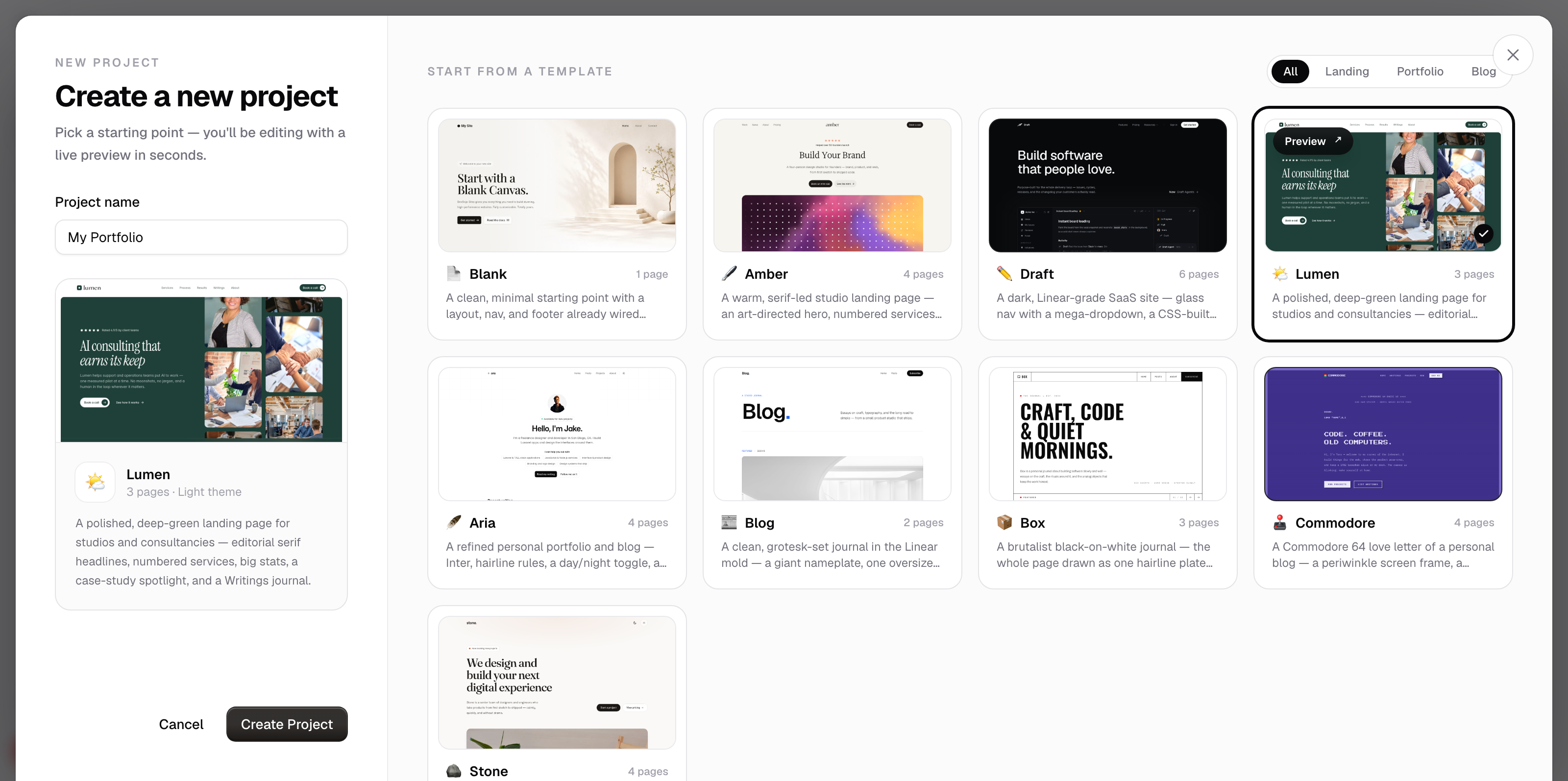
Each template is also a lesson. The files are commented to explain what's happening — the fastest way to learn DevDojo Sites is to create a site and read (or click) your way through it. Every template is built in the Blade syntax these docs describe.
The three below are the foundations — the clearest teachers of the grammar. Everything else in the gallery builds on the same patterns with more sections, more pages, and more motion.
Blank 📄
The minimal starting point — with the good habits already in place.
Don't let the name fool you: Blank isn't empty. It's the skeleton every site wants, so you never start from a truly blank file:
components/layouts/main.blade.php— a layout with@vite, a{{ $title }}prop, and<x-nav/>/<x-footer/>components/nav.blade.php+components/footer.blade.php— your first reusable components, each with a companion.ymlcomponents/sections/hero.blade.php— a section component wired to the Visual inspectorpages/index.blade.php— a clean centered hero, composed of section tagsresources/css/site.css— example custom CSS (theme tokens for fonts and colors, a styled text selection, a dot-grid background utility)
Teaches: layouts and {{ $slot }}, components with @props, companion .yml fields, and how custom CSS flows through @vite.
Pick it when: you know what you want to build and just need the scaffolding.
Lumen 🌤️
A complete product landing page for a fictional consultancy.
This is the kitchen-sink template — hero, numbered services, big stats, a case-study spotlight, process steps, team, FAQ, a Writings journal, and an about page:
- The services grid loops over
resources/data/collections/services.jsonwith@foreach ($services as $service)— edit the JSON, the cards update, and{{ $loop->iteration }}drives the 01–04 labels. - Process steps, team, and FAQ come from their own collections, rendered the same way.
- Sections are components — the homepage composes
<x-sections.…>tags, each passing its own copy through attributes and its data through bound attributes (:items="$services"). - The layout passes both
titleanddescriptioninto the<head>— a good SEO habit to steal. - The Writings journal pairs a collection with a dynamic page —
pages/writings/[writings.slug].blade.phpserves every article fromwritings.json, so publishing a new one is just adding an entry.
Teaches: collections, @foreach, $loop, component props, bound attributes, dynamic detail pages, and a multi-page site structure.
Pick it when: you're launching a product, or you want the full guided tour of what Sites can do.
Aria 🪶
A personal portfolio and blog with a clean, editorial feel.
Home, sites, posts, and about pages for a fictional developer, powered by small JSON collections:
- The homepage shows the top three sites; the sites page lists them all from the very same
resources/data/collections/sites.json— same data, two views:
@foreach ($items as $site)
    <!-- one site card -->
    @break($loop->iteration == 3)
@endforeach
The homepage caps the loop with @break; the sites page drops it and shows every site.
- The blog does the same trick with a reusable component:
<x-posts-loop :items="$items" count="3"/>on the homepage, a biggercounton the posts page — the cap is just a prop. - Every blog post is a dynamic page: one file,
pages/post/[post.slug].blade.php, serves/post/{slug}for every entry incollections/post.json— the post's meta and its body HTML (content) live in the collection, and publishing a new post is just adding an entry. - Even the nav is data — the layout declares
menuin its@propsand each page hands itmenu.jsonwith a bound attribute (:menu="$menu").
Teaches: one collection powering multiple pages, dynamic detail pages, @break for "first N", $loop, and — since a collection is readable directly in any component by default — when a bound attribute is still the right call: genuine per-instance reuse, like the same posts-loop component capped differently on two pages.
Pick it when: you're building a portfolio, or any site where a list of things (sites, posts, talks…) is the star.
Poke around — that's the lesson
However you like to learn, your new site will teach you:
Click around the canvas — every section lights up with a name chip, and the sidebar's Sections | Layout | Page tabs show how each page is put together. Select a section and the inspector shows exactly which pieces of it are editable.
Flip to Code and read the files — they're commented to explain what's happening. Start at resources/views/pages/index.blade.php, then follow the tags outward to their files:
<x-layouts.main title="Home">
    <x-sections.hero heading="Hi there" />
</x-layouts.main>
After you pick
A template is a starting point, not a cage — every file is yours to edit, rename, or delete. Swap in sections from the library, rewrite the copy, and make it yours.