We know how to user Recyclerview in android and we have created Recyclerview Item Click events in the previous post. In this post we will learn add CardView to Recyclerview
What is CardView? CardView is a Material Widget which acts ad Framelayout with adding extra features like background color, round the corners, elevation and shadow to the background
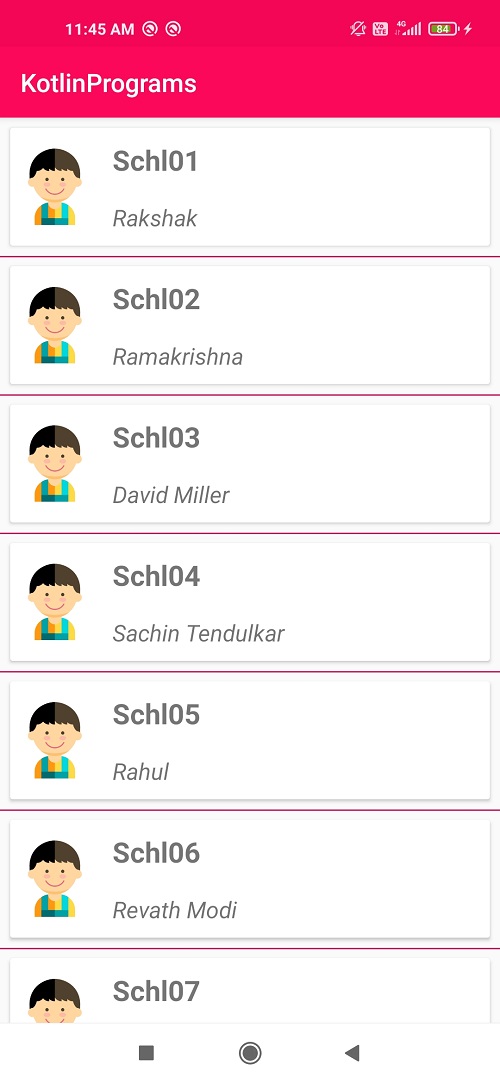
Step 1: Create Android application in Android studio Step 2: Add Recyclerview inside xml file
<?xml version="1.0" encoding="utf-8"?>
<androidx.constraintlayout.widget.ConstraintLayout xmlns:android="http://schemas.android.com/apk/res/android"
        xmlns:tools="http://schemas.android.com/tools"
        xmlns:app="http://schemas.android.com/apk/res-auto"
        android:layout_width="match_parent"
        android:layout_height="match_parent"
        tools:context=".recyclerview.RecycleRippleEffect">

    <androidx.recyclerview.widget.RecyclerView
            android:layout_width="0dp"
            android:layout_height="0dp"
            android:id="@+id/recyclerView"
            app:layout_constraintEnd_toEndOf="parent"
            app:layout_constraintTop_toTopOf="parent"
            app:layout_constraintStart_toStartOf="parent"
            app:layout_constraintBottom_toBottomOf="parent" />

</androidx.constraintlayout.widget.ConstraintLayout>
Step 3: Create a model data class which represents the students list where we will read data from local json file from assets folder
package com.rrtutors.kotlinprograms.recyclerview

data class Student(var name:String,var rollNo:String) {
}
Step 4: Let's create Recyclerview child layout by adding CardView as parent widget
<?xml version="1.0" encoding="utf-8"?>
<androidx.cardview.widget.CardView xmlns:android="http://schemas.android.com/apk/res/android"
        xmlns:app="http://schemas.android.com/apk/res-auto"
        xmlns:tools="http://schemas.android.com/tools"
        android:layout_width="match_parent"
        android:layout_margin="5dp"
        android:elevation="5dp"
        app:contentPadding="5dp"
        android:background="?android:attr/selectableItemBackground"
        android:layout_height="wrap_content">

<androidx.constraintlayout.widget.ConstraintLayout
        android:layout_width="match_parent"
        android:layout_height="wrap_content"
        >

    <ImageView
            android:id="@+id/img"
            android:layout_width="60dp"
            android:src="@mipmap/ic_launcher"
            app:layout_constraintStart_toStartOf="parent"
            android:layout_height="60dp"
            app:layout_constraintBottom_toBottomOf="parent"
            app:layout_constraintTop_toTopOf="parent" />

    <TextView
            android:id="@+id/st_name"
            android:textSize="22sp"
            android:text="Name"
            android:layout_width="0dp"
            android:layout_marginLeft="10dp"
            android:padding="5dp"
            android:layout_height="wrap_content"
            android:textStyle="bold"
            app:layout_constraintEnd_toEndOf="parent"
            app:layout_constraintTop_toTopOf="parent"
            app:layout_constraintStart_toEndOf="@+id/img" />

    <TextView
            android:id="@+id/st_number"
            android:textSize="18sp"
            android:text="No"
            android:padding="5dp"
            android:layout_width="0dp"
            android:layout_height="wrap_content"
            android:textStyle="italic"
            app:layout_constraintStart_toStartOf="@+id/st_name"
            app:layout_constraintEnd_toEndOf="parent"
            app:layout_constraintTop_toBottomOf="@id/st_name"
            android:layout_marginTop="8dp" />
</androidx.constraintlayout.widget.ConstraintLayout>

</androidx.cardview.widget.CardView>
Here we added Custom Ripple Effect to CardView as background.
Download complete example code for How do i add Cardview to RecyclerView android kotlin example
 View Website
 View Website
 View Website
Comments (0)